Good news! We’ve made it easier for Texas Children’s Health Plan members to log in to the MyChart website. Now, you can access all your MyChart health care features anytime, anywhere using our new sign-in widget. Click the link to log in now
¡Buenas noticias! Hemos hecho más fácil el inicio de sesión en MyChart para nuestros miembros de Texas Children’s Health Plan. Ahora puedes acceder a todas las funciones de cuidado médico de MyChart en cualquier momento y desde cualquier lugar mediante nuestro nuevo widget de inicio de sesión. Haz clic en el enlace para iniciar sesión.
Important UpdateActualización importante:
Good news! All CHIP, STAR, and STAR Kids Member Handbooks are now available online. Quick, easy access to your benefits and coverage information - any time!
¡Buenas noticias! Todos los manuales para miembros de CHIP, STAR y STAR Kids ya están disponibles en línea. Obtén acceso rápido y sencillo a la información sobre tus beneficios y cobertura, ¡en cualquier momento!
Texas Children’s® Link: Update on Check Remittance Advice
Date: February 6, 2025
Attention: All Providers
Texas Children’s Health Plan (TCHP) would like to inform providers of recent updates to the Check Remittance Advice on our provider portal, Texas Children’s® Link. These updates now include recoupment details, which provide valuable information for improved tracking and management. The new details show the date the recoupment took place, the original claim and the reprocessed claim numbers, and any outstanding recoupment to come. These changes are designed to help providers streamline their processes and improve transparency of claim adjustment.
How to Find Recoupment Information within Texas Children’s® Link Remittance Advice
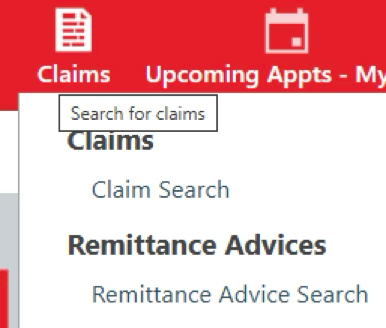
To access the recoupment details, navigate to “Remittance Advice” section within the provider portal. Simply hover over the “Claims” icon at the top of the website, then select “Remittance Advice Search” from the drop-down menu.
Image
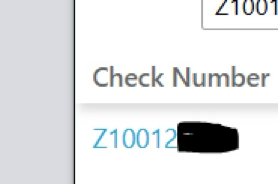
When you locate the Remittance Advice you want to review, click into the Check by selecting the Check Number.
Image
Scroll to the bottom of the Remittance Advice that opens up after selecting the Check Number.
How to Read and Review the Remittance Advice
There are two new sections to TCHP’s Remittance Advice:
Other Transactions (These are the claim recoupments that were identified or took place in this check)
Date
If the Net Payment is positive, this is the date that the recoupment was identified and added as a recoupment to your account
If the Net Payment is negative, this is the date that the recoupments were processed
Description = This holds the original claim information as well as the reprocessed claim information
Net Payment
If positive, this is the amount identified to be recouped from a future check
If negative, this is the amount that has been recouped from the current check
Outstanding Liability Report (These are the claims that TCHP still has left to recoup from future checks)
Date = Date TCHP received the original claim
Description = This holds the original claim information as well as the reprocessed claim information
Total = The amount of outstanding dollars for TCHP to recoup. These recoupments will occur from future checks.
NOTE: You will see a claim on this list and on your “Other Transactions” list (as a positive number) if the claim was reprocessed and the recoupment amount identified on this check.
Next steps for providers: Providers are encouraged to share this communication with their staff.